

Zenless Zone Zero Monochrome Top Up
Looking for a fast and reliable way to recharge Monochrome in Zenless Zone Zero? Jubaly makes it simple: place an order using only your User ID + Zone/Server, and your top-up is processed automatically—day or night (24/7).
What kind of game is Zenless Zone Zero?
Zenless Zone Zero is a stylish action RPG where you build a team, explore different combat scenarios, and progress your account through missions and events. As you advance, premium currency becomes useful for getting more value from banners, bundles, and time-limited offers.
Why top up Monochrome?
Monochrome is a premium currency that helps players access paid content and convenience options. Depending on what’s available in your region/version, Monochrome can be used for things like:
-
Converting into other in-game currencies used for pulls/banners
-
Buying exclusive packs and limited-time deals
-
Unlocking upgrade materials faster through bundles
-
Supporting account progression with time-saving items
(Note: exact items and shop offers can change by region and in-game events.)
What can you do with Monochrome?
Players typically use Monochrome to:
-
Grab event bundles when discounts appear
-
Get extra resources to strengthen characters/gear
-
Manage progression more smoothly without waiting
Why Jubaly is best for Monochrome top up
-
Instant & automatic delivery (24/7) – no waiting for manual processing
-
Easy order method – only User ID/Zone needed
-
Multiple payment options – pay via Visa/Mastercard, Crypto (Binance/Bybit), RedotPay, bKash, Nagad, and more
-
Secure checkout – your payment stays protected; you don’t need to share game passwords
-
Trusted top-up store – plus you’ll find many other game top-ups and gift cards on Jubaly
How to find Zenless Zone Zero User ID & Zone
Follow these common steps (menu names may vary slightly by device/updates):
-
Open the game and go to the main screen
-
Tap Menu / Settings (often shown as a gear icon)
-
Look for Account / Profile / Basic Info
-
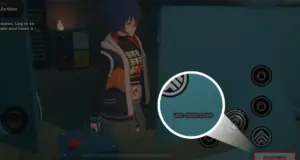
Look at the bottom-right corner — you’ll usually see UID: 15xxxxxxxxx there.
-
Check your Zone/Server/Region (sometimes shown near account info or login region)
✅ Tip: Double-check the ID/Zone before paying—wrong details can send the top-up to the wrong account.
FAQ
1) What info do I need to top up?
Only your User ID + Zone/Server. No password needed.
2) How fast is delivery?
Most orders are processed instantly via 24/7 automatic delivery. In rare cases (network/verification delays), it may take a little longer.
3) Is it safe to top up from Jubaly?
Yes—use the correct User ID/Zone, and never share your game password with anyone.
4) What payment methods are supported?
Visa/Mastercard, Crypto (Binance/Bybit), RedotPay, bKash, Nagad and other available options at checkout.
5) What if I entered the wrong User ID/Zone?
Contact support immediately with your order details. If the recharge is already completed to another account, it may not be reversible—so please confirm before checkout.
6) Do you offer other top-ups too?
Yes—Jubaly offers many other game top-ups and digital gift cards in one place.